Defense / Steam Demo · September–October 2026
Gun Turret
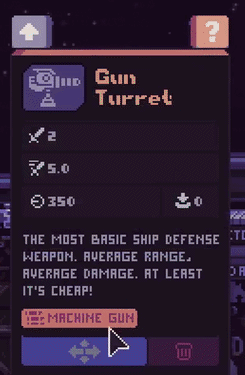
The Gun Turret is the basic ship-defense gun, labelled Machine Gun in its information panel. Select the gun and open ? to identify it. You can keep it by moving it for free, or demolish it to recover construction resources and lose the kit.
Updated 2026-10-29 · Steam Demo · September–October 2026
 Enlarge ↗
Gun Turret at a glance
| Panel name | Gun Turret |
|---|---|
| Weapon family | Machine Gun |
| Role | Basic ship defense |
| Information panel | Select the turret, then open the ? beside its upgrade arrow. |
How to get it
For turret kits, use the turret-themed boxes in the post-battle shop. Open a turret box and choose a Gun Turret kit when it appears in the selection. A particular kit is not guaranteed in each box; use the kit guide below to understand the updated shop.
What it is for
Place it along the ship’s hull to shoot approaching aliens. The Gun Turret’s own description presents it as the basic defensive weapon. Read the selected gun’s panel for its current combat values. The Airlock and its units are the final safety net for enemies that pass your turret defenses.
Move or demolish?
The two bottom controls do different jobs. Use the four-direction arrow on the left to preserve the gun when changing its position. The trash can on the right dismantles it. The September Demo applies these rules to turrets:
| Action | Resources and kit | Time or consequence |
|---|---|---|
| Move | Free; preserves the turret and its kit. | Very slow relocation, followed by downtime. |
| Demolish | Returns all construction resources; the kit is not returned. | The turret is removed. |
