Shipbuilding / Steam Demo · September–October 2026
Hull Blocks
Hull Blocks add empty module space and change the ship’s outer route. Hull Construction offers 15 shapes in a random order without repeats until the set cycles. You cannot rotate a block or destroy it after placement, so check both its space and its position before committing.
Updated 2026-10-29 · Steam Demo · September–October 2026
 Enlarge ↗
Hull Blocks at a glance
| Available shapes | 15 in the October devlog |
|---|---|
| Offer order | Random; no repeat before the entire set cycles |
| Construction resources | Energy early; Plasteel later |
| Skip | Costs resources; check the displayed price |
Where blocks come from
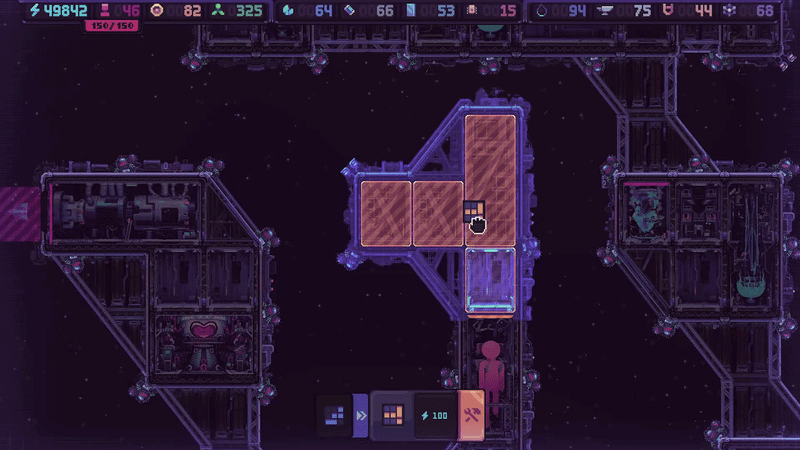
While the ship is flying, choose the rightmost crossed-tools tab at the lower left to enter Hull Construction. Flight pauses and the offered block appears. You can place it beside any side of the hull or a short distance away on stilts, leaving a corridor for aliens.
What the shape changes
A block affects two kinds of space at once: the module slots inside and the enemy path outside. Check the module kits you have or are aiming for before choosing a shape. More empty cells are useful only if they form space for the modules you want.
Placement limits
These are decisions to make before placement. The system does not offer a later rotate-or-remove correction.
| Check | Rule |
|---|---|
| Rotation | The offered block cannot be rotated. |
| Removal | A placed hull block cannot be destroyed. |
| Access | Do not block the Airlock or Engine. |
| Skip or place | Both consume resources; read the current displayed cost. |
From block to usable module space
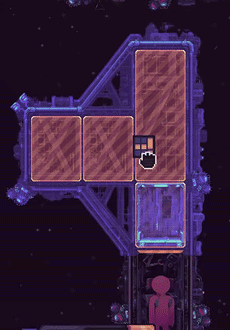
The orange preview shows the empty cells a block would add. Placing the hull does not make every slot immediately buildable: module construction still needs a completed module next to the target slot.
 Enlarge ↗