Production & kits / Steam Demo · September–October 2026
Info Mode
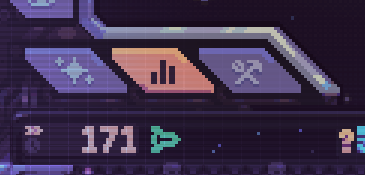
Info Mode is opened with the bar-chart tab at the lower left of the screen. The number below each resource total is its current production rate, expressed per minute. Use it to check what the ship is producing now, rather than predicting what its stock will be later.
Updated 2026-10-29 · Steam Demo · September–October 2026
 Enlarge ↗
Info Mode at a glance
| Entry control | Bar-chart tab at the lower left |
|---|---|
| Main number | Current resource stock |
| Income row | Current production rate per minute |
| Prediction | Does not forecast shortages or production caps |
Where to open it
Find the angled tabs at the lower left of the game screen and choose the bar-chart icon. The image shows that chart tab highlighted. This is a different control from the crossed-tools Hull Construction tab to its right.
Stock is not the same as production rate
Read the resource total as what you currently hold, then read the income row beneath it as the speed of current production. The update also describes some actions showing how income might change. Recheck the live rate after a change rather than extending one reading indefinitely into the future.
Use the two rows for different questions
A resource can have stock available even while its future supply is at risk. Inspect the current rate together with the input chain.
| Display | Question it answers |
|---|---|
| Stock total | How much of this resource do I hold now? |
| Per-minute income | How quickly am I producing it right now? |
| Inputs and cap | What could change that rate next? Check the modules themselves. |
Read the income row
A positive reading describes production at the moment shown. Inputs can run short and production can reach a cap later; neither event is predicted by simply displaying the present rate.
 Enlarge ↗